
How to Build a Steam Next Fest Demo Without Derailing Your Actual Game
Steam Next Fest demo guide for indie devs: pick the right Fest, freeze scope, QA the first session, and protect your game from demo debt later.
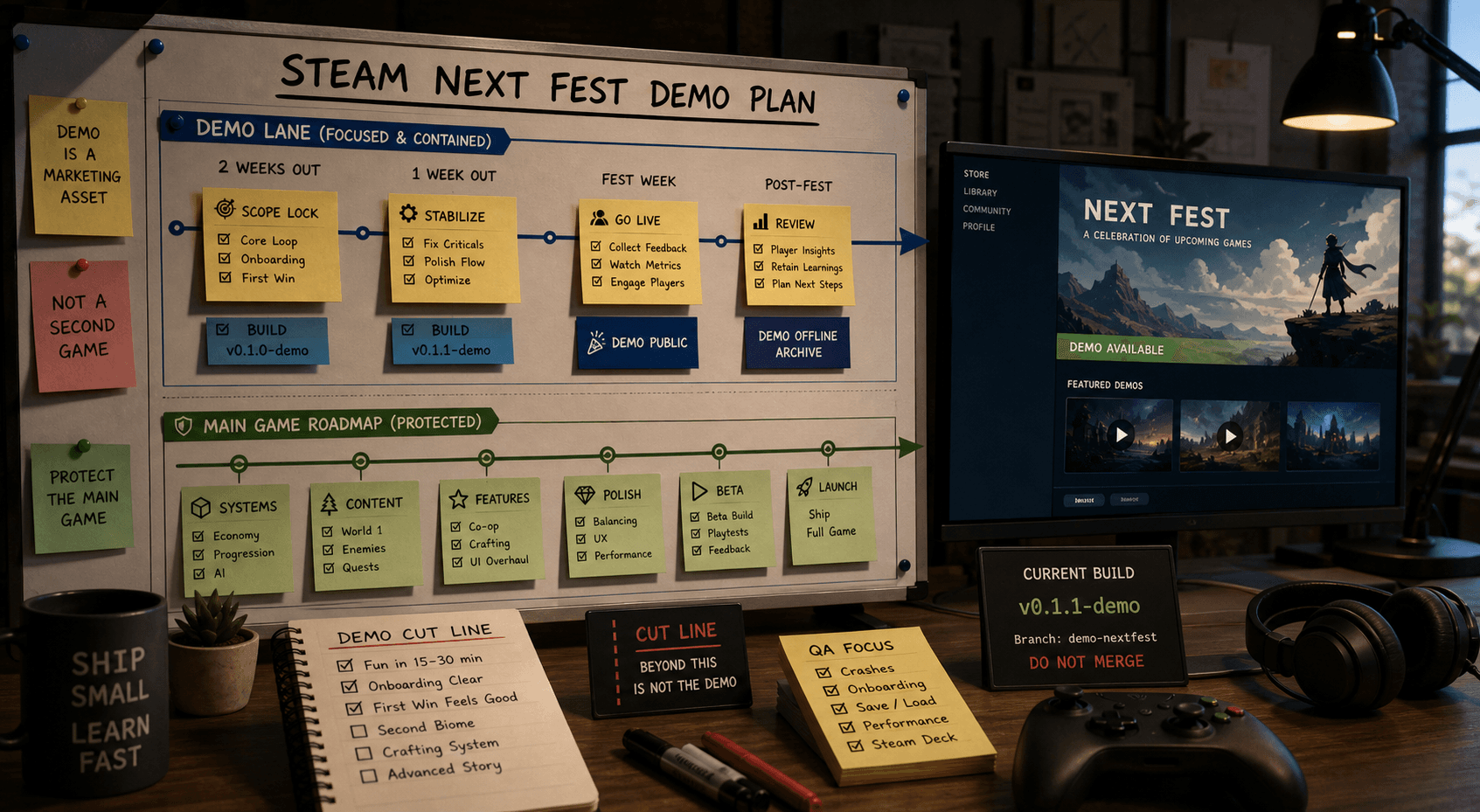
A Steam Next Fest demo is not a second game. It is a public test of the first 15 to 30 minutes of trust: does the game launch, does the player understand the loop, does the promise on the Steam page match what they can play, and does the demo end before it starts borrowing six months from the real roadmap?
This guide gives you a production-safe workback plan for a Steam Next Fest demo. By the end, you will have a way to pick the right Fest, freeze the demo scope, keep demo hacks out of the main game, pass Steam review with enough buffer, and turn festival traffic into useful feedback instead of a new pile of half-finished systems.
What you need before you start:
- A Steam Coming Soon page, or a dated plan to submit one.
- One playable core loop, even if the art around it is still rough.
- A task board with a hard "not for demo" lane.
- At least one outside player or contributor who can test the demo before Steam does.
1. Pick the right Next Fest before you build anything
Steam Next Fest is for unreleased games with playable demos. Valve currently runs it three times a year, in February, June, and October. Each eligible game can participate in only one Next Fest, so the first decision is not "how fast can I make a demo?" It is "which Fest gives this game the best shot?"
Check the current Steamworks Next Fest documentation before you lock the plan. As of May 21, 2026, Valve lists the June 2026 Fest as June 15 to June 22, with registration already closed on April 27 and required items due June 3. The October 2026 Fest is listed for October 19 to October 26, with registration due August 31 and required items due October 5. Those dates will change for future events.
Eligibility is the first gate. Valve requires a good-standing Steamworks account, a public store page for the base game, a public playable demo before the Fest starts, and a game that will remain unreleased until after the Fest. Your game also cannot have already participated in Next Fest, and it cannot be a prologue, chapter, preview, or short-form version of something already released.
There is no exclusivity requirement, no newness requirement, and no required demo length. That gives you room to be sane. Pick the Fest that fits your production calendar, not the Fest that flatters your optimism.
2. Write the demo promise in one sentence
Before you make a demo build, write the sentence the demo has to prove.
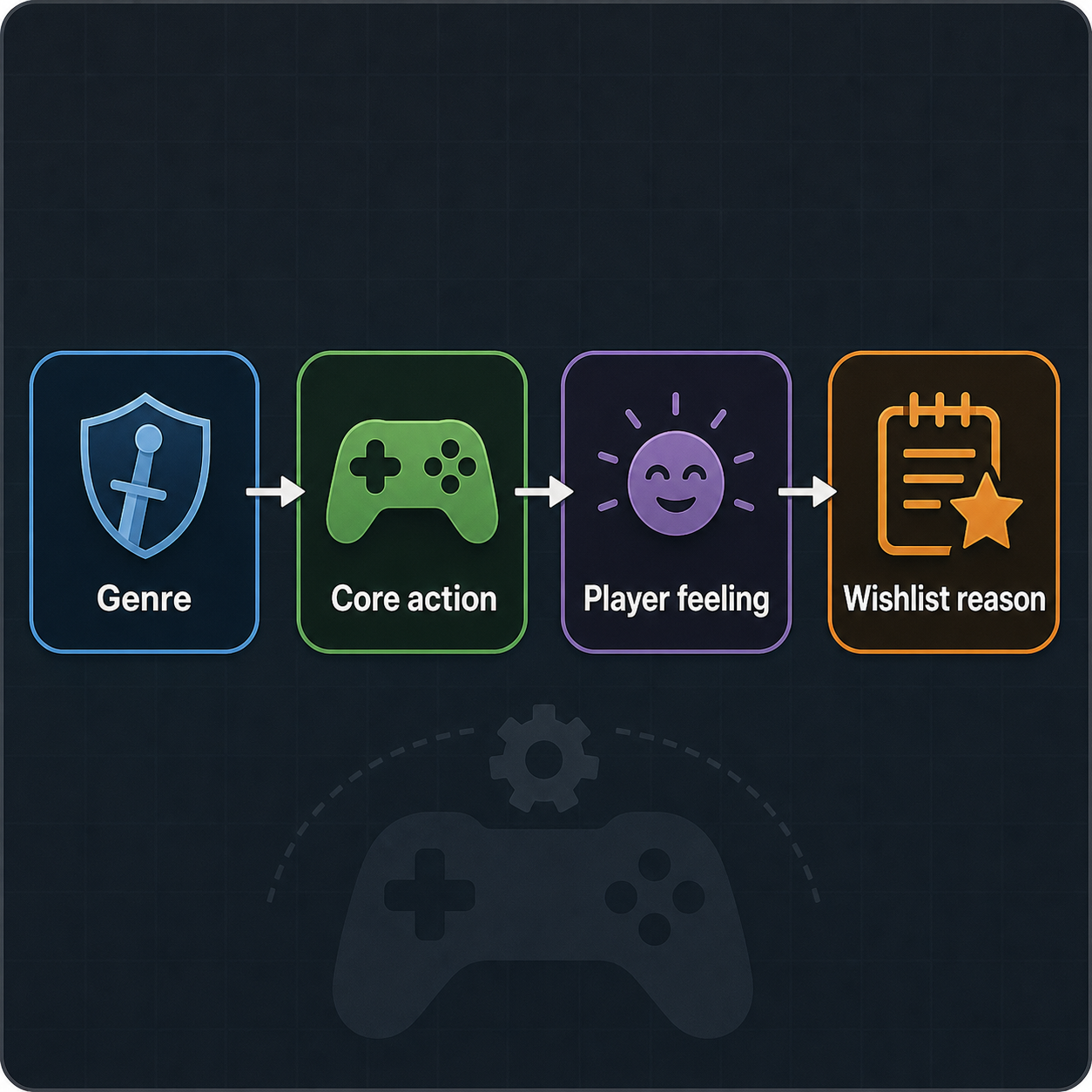
Use this format:
In 20 minutes, the player should understand that this is a [genre] about [core action], feel [specific fantasy], and want to wishlist because [specific unresolved promise].
Examples:
- In 20 minutes, the player should understand this is a tactical cooking roguelike about chaining recipes under pressure, feel clever under chaos, and want to wishlist because the ingredient combos clearly get stranger later.
- In 15 minutes, the player should understand this is a cozy exploration game about repairing abandoned machines, feel calm but curious, and want to wishlist because the island keeps hinting at larger systems.
- In 25 minutes, the player should understand this is a precision platformer about swapping gravity, feel the mechanic click, and want to wishlist because the last room shows where mastery can go.
The demo promise is a cut line. Anything that does not support that sentence is not in the demo. Not the crafting system you still love. Not the second biome. Not the elaborate intro cinematic that explains lore nobody has asked about yet.
Competitor guides often say "scope your demo." Fine. This is how you scope it. One sentence, one promise, one player experience.
3. Freeze a demo-only scope list
Open your task board and create three lanes:
| Lane | What goes there | Rule |
|---|---|---|
| In the demo | Work required to prove the demo promise | Must ship before code freeze |
| Borrowed from the main game | Existing systems or content reused as-is | Do not expand just for demo |
| Not for demo | Anything tempting but unnecessary | Closed unless it fixes a blocker |
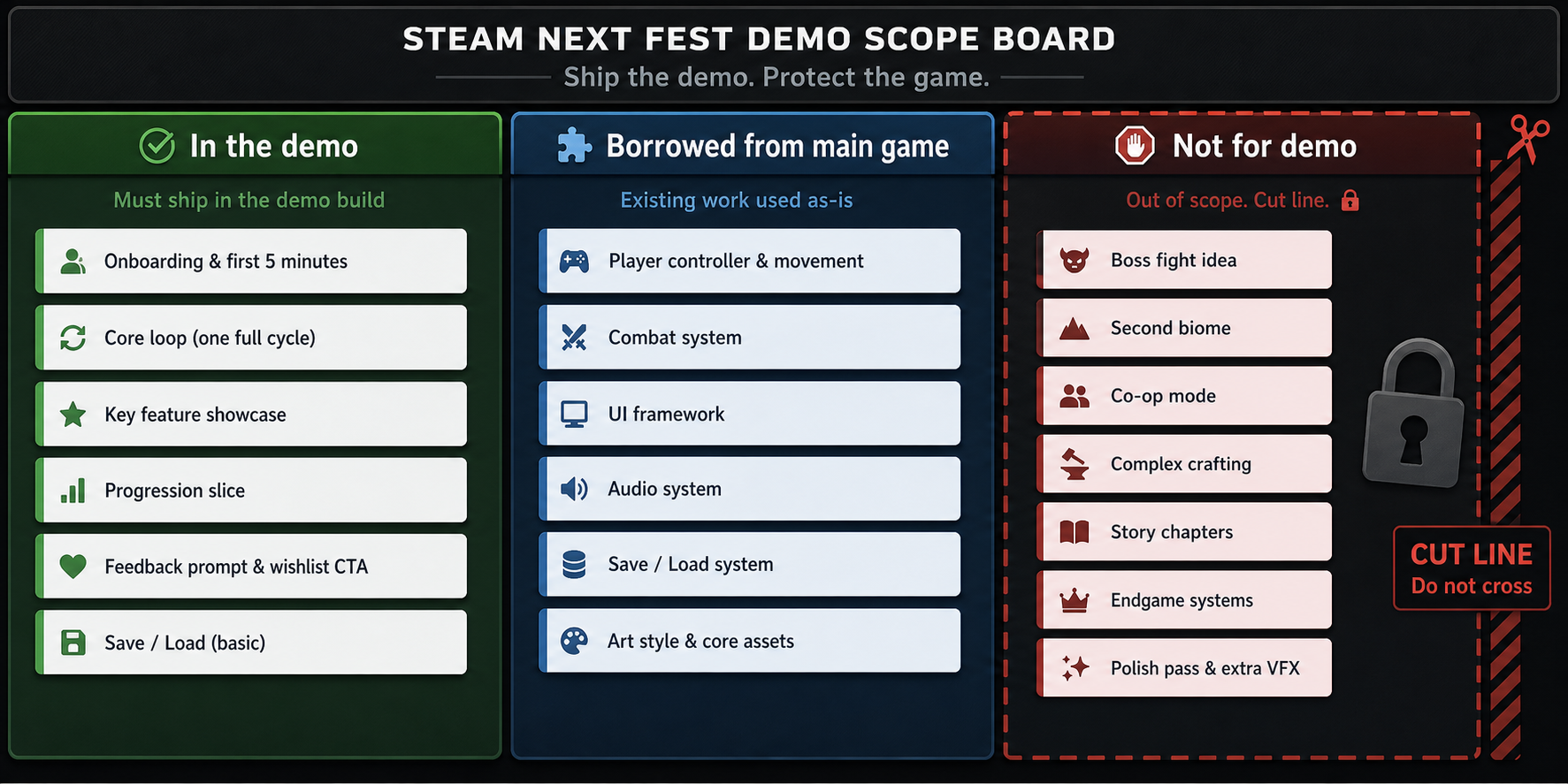
The third lane is the one that saves you. A Steam Next Fest demo derails the main game when every useful idea becomes "small enough to add." It never is. A new enemy needs animation, sound, tuning, tutorialization, QA, screenshots, localization strings, and save-state decisions. That is not a small addition. That is a branch of the game pretending to be a task.
Use the microscopic rule from game jam thinking: if the demo can work without it, it starts outside the demo. You can promote one item only when it fixes a concrete failure in the demo promise. "The demo feels thin" is not concrete. "Four of five testers do not understand the loop before room three" is concrete.
This is where you link the demo back to the main game instead of letting it hijack the roadmap. The demo is allowed to borrow. It is not allowed to become the production plan.
4. Build the demo branch without poisoning the main game
Create a demo branch, demo build target, or demo content folder. The exact setup depends on your engine and project size, but the rule is the same: demo work must be easy to identify after the Fest.
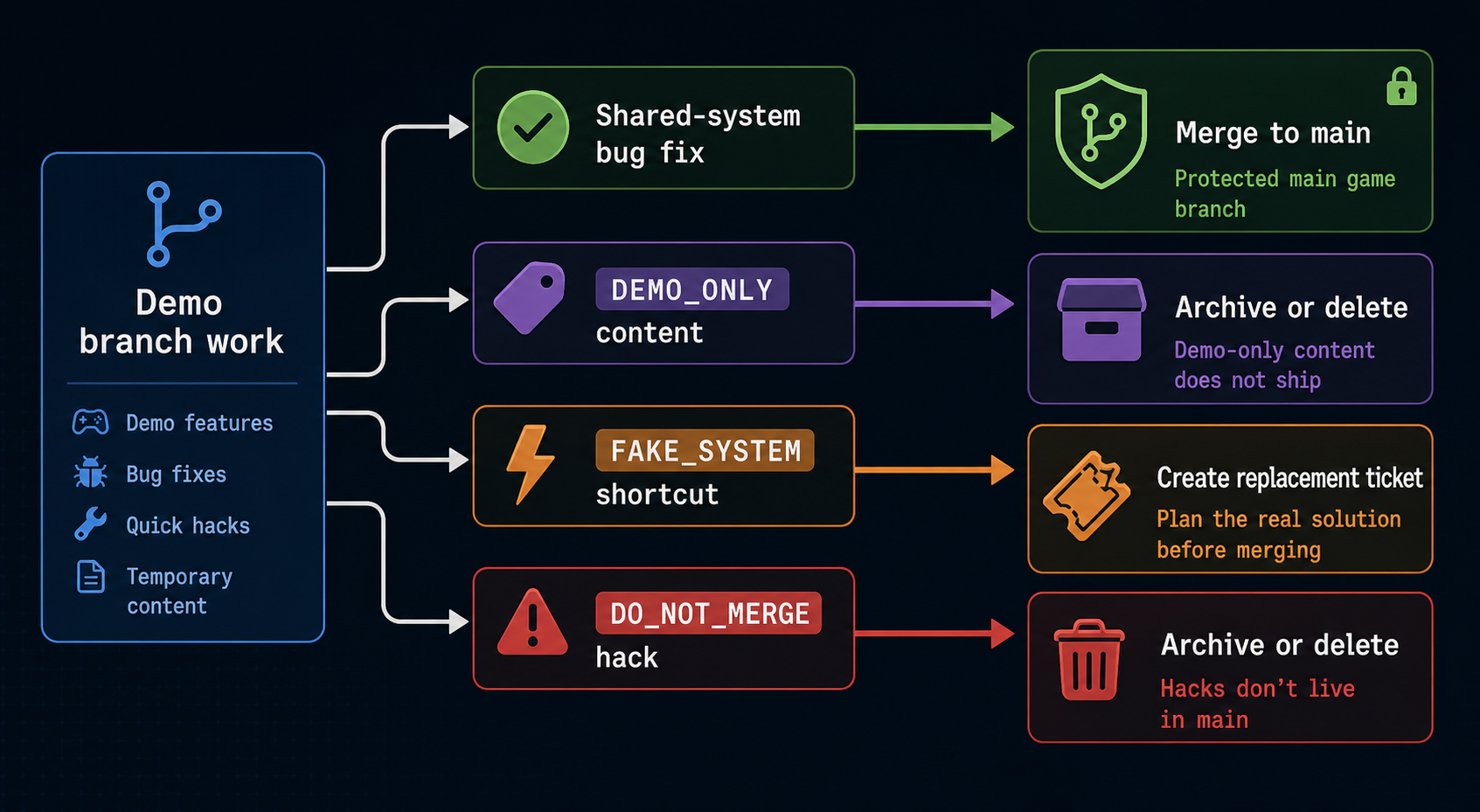
Label anything that should not become permanent:
DEMO_ONLYfor scenes, maps, or content packs made only for Next Fest.PLACEHOLDERfor art, UI, audio, and text that should be replaced before release.FAKE_SYSTEMfor hard-coded menus, progression gates, inventory shortcuts, or scripted moments.DO_NOT_MERGEfor hacks that exist only to make the demo path stable.
This sounds fussy until the Fest ends and you cannot remember which shortcuts were harmless. One transcript candidate put the risk cleanly: changing one small variable can throw everything off. That is twice as true when the demo branch exists under deadline pressure.
Decide the merge-back rule before you start:
- Bugs fixed in shared systems can merge back.
- New content can merge back only if it exists in the full-game plan.
- Demo-only onboarding can merge back only after you test it against the full game.
- Fake systems never merge back without a ticket that replaces the fake with the real version.
If you are working with other contributors, assign ownership here. One person owns the demo branch. One person owns the main game branch. If that sounds too formal for a small project, good. Small projects are exactly where accidental branch poisoning happens.
5. Set a code-freeze date before the Steam review date
Valve says developers should submit their demo build for review at least two weeks before Next Fest starts, or risk missing participation. Build review checks basic function. It is not your QA department.
Work backward from the Fest date:
| Workback point | Minimum timing | What should be true |
|---|---|---|
| Fest starts | Day 0 | Demo is public before Valve's event start time |
| Steam review buffer | 14+ days before | Demo build submitted and store assets ready |
| Internal code freeze | 18-21 days before | No new features, only blocker fixes |
| External playtest | 25-30 days before | Fresh players test the full demo path |
| Scope freeze | 6-8 weeks before | Demo promise and task lanes locked |
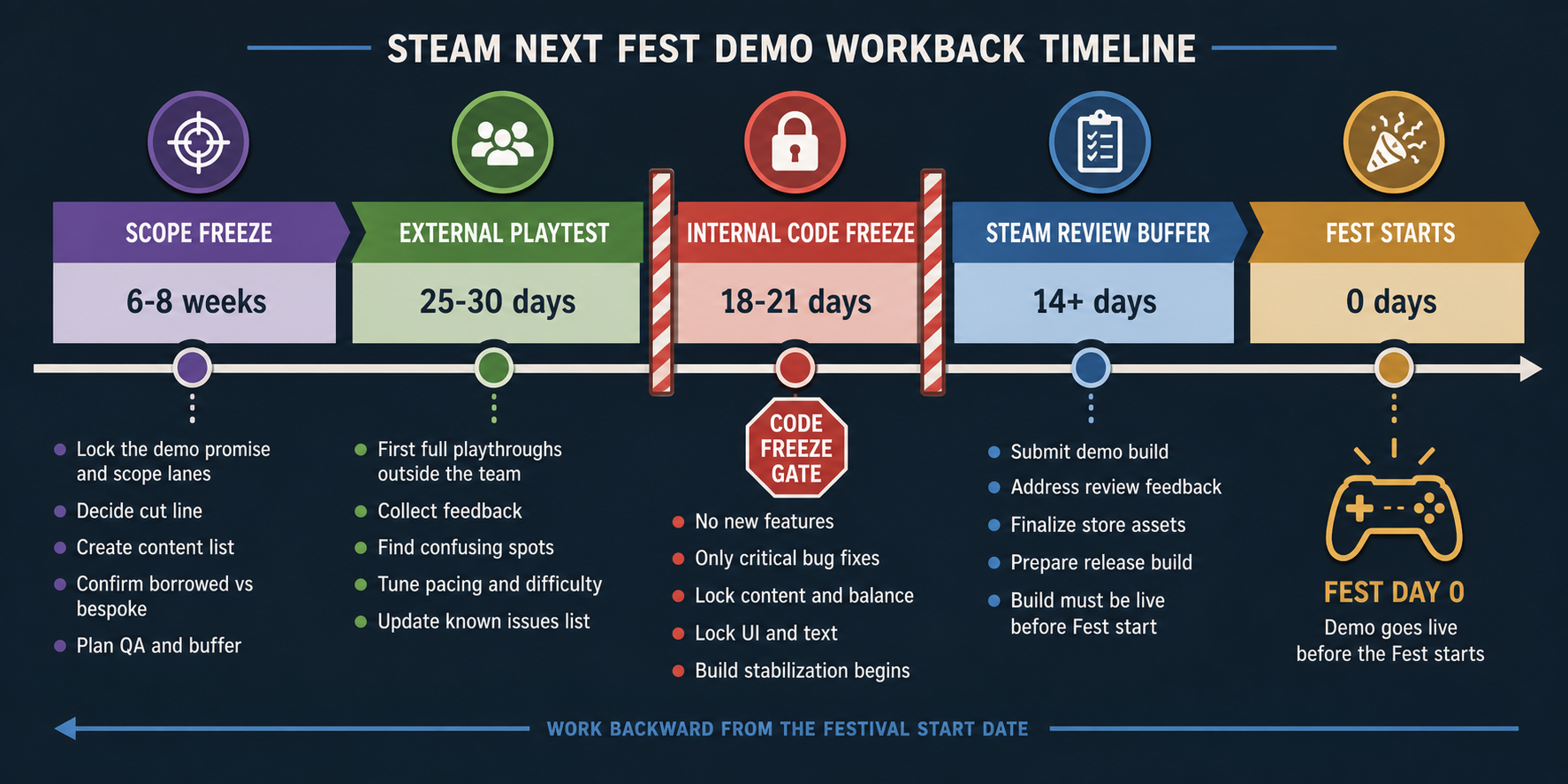
The code freeze is the part you will want to negotiate with yourself. Do not. One launch transcript had the right instinct: "I'm just not touching it." Another line from the same source names the reason: past a certain point, there is nothing else you can do except break the game.
Use bug danger levels after freeze:
- D1: Crash, save corruption, launch failure, hard progression blocker. Fix.
- D2: Player confusion that blocks the demo promise. Fix if contained.
- D3: Visual polish, balance tweak, nice-to-have feature, minor content gap. Do not touch before review.
If the fix risks creating a worse bug than the bug itself, it waits. A demo that is slightly ugly but stable beats a prettier build that crashes on the first streamer.
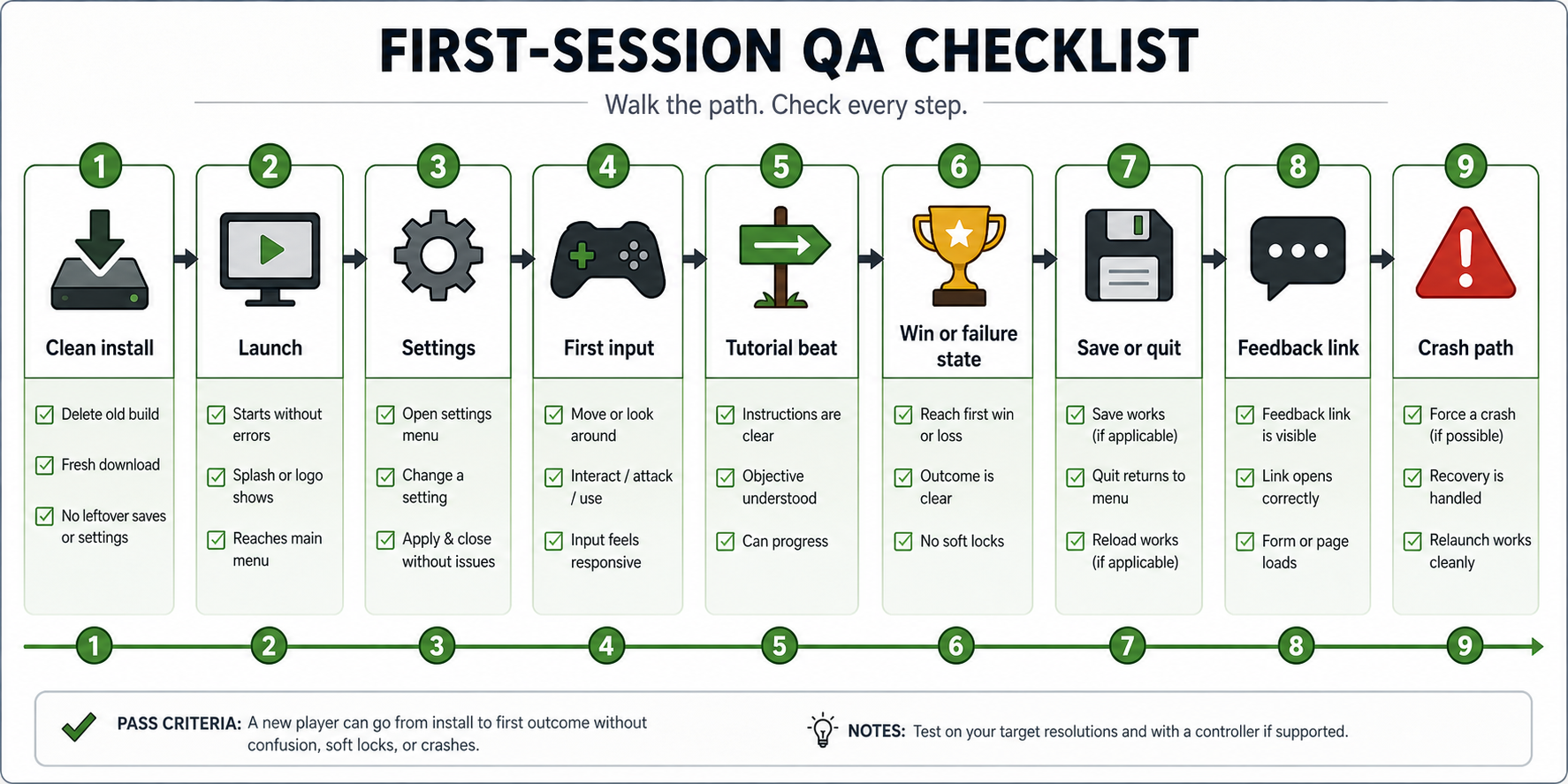
6. QA the first-session path, not the whole dream game
Your Next Fest demo does not need full-game QA. It needs first-session trust.
Run the test like a player will:
- Install from a clean machine.
- Launch from Steam, not the editor.
- Start with default settings.
- Play without dev commentary.
- Quit and relaunch.
- Check whether progress, settings, or save state behave the way the demo promises.
- Click the wishlist, feedback, Discord, newsletter, or survey links.
- Try controller and keyboard if your store page says both are supported.
Then watch a fresh player do the same thing. Do not explain. Write down where they hesitate.
Your QA checklist should cover:
- Install and first launch.
- Main menu and settings.
- First input prompt.
- First tutorial beat.
- First win or failure state.
- Any save/load behavior you expose.
- Audio levels and subtitle basics.
- Steam overlay, wishlist CTA, and feedback link.
- Crash path, if the player quits mid-run.
- Steam Deck basics if you claim support or expect Deck traffic.
Valve recommends putting feedback links in the demo, setting up a demo feedback subforum, and making demo deactivation messaging clear. Do that before the build goes public. Feedback that lives in five scattered Discord DMs is not a feedback system. It is homework you will avoid.
7. Set up the Steam demo like a real store asset
A Steam demo has its own app setup. In Steamworks, the demo app type should be "Demo," and the demo should reference the base game's App ID in General Application Settings. After release, Valve says you need to republish the base game store page for the Download Demo button to appear.
Treat that as production work, not admin.
Your Steam setup checklist:
- Demo app created and linked to the base game App ID.
- Demo build uploaded and tested from Steam.
- Base store page republished after demo release.
- Demo button visible on the base game page.
- Demo capsule, screenshots, and trailer updated if you use a separate demo page.
- "Wishlist the full game" CTA visible in-game and on the store page.
- Feedback link tested from the live build.
- Deactivation message written if you plan to remove the demo later.
- Press Preview readiness checked if you are using it.
Do not bury the demo under clever messaging. Players should know what they are downloading, what they get, how long it roughly takes, and where to wishlist when they are done.
8. Run Next Fest as feedback capture, not a miracle wishlist machine
Steam Next Fest can send a lot of players. It does not owe you conversion.
One local transcript had the useful caution: a demo got 80,000 downloads, while Next Fest itself did not make that much of an impact for wishlists. How To Market A Game's 2026 survey found that demos launched well before Next Fest performed better in its sample, with earlier demos earning about 2.5x more wishlists. The practical takeaway is not "Next Fest is bad" or "launch early and relax." It is that the Fest rewards demos that have already survived contact with players.
Track five things during the Fest:
| Signal | Why it matters |
|---|---|
| Launch-to-menu success | Basic trust |
| Tutorial completion | Whether the first-session path works |
| First quit point | Where confusion or boredom hits |
| Wishlist clicks | Store-promise fit |
| Written feedback themes | What to fix in the main game |
Do not rewrite the demo mid-Fest unless a D1 bug appears. The better move is to collect clean signal. If half the players quit at the same door, that tells you something. If you patch the door, the tutorial, and the enemy timing all at once, you just destroyed the experiment.
The demo is marketing, but it is also research. Let it teach you.
9. Tear down, merge back, or kill the demo work after the Fest
The week after Next Fest is where demo debt tries to become the game.
Schedule a post-Fest decision meeting before the Fest starts. If you are solo, put it on the calendar anyway. Make four calls:
- Keep the demo live. Use this if the build is stable, feedback is useful, and the demo still matches the current game.
- Patch the demo once. Use this if one small fix would remove a major blocker for future players.
- Retire the demo. Use this if the demo no longer represents the game or requires support you cannot afford.
- Merge learning into the main game. Use this for onboarding, store copy, level order, bug fixes, and player-language insights.
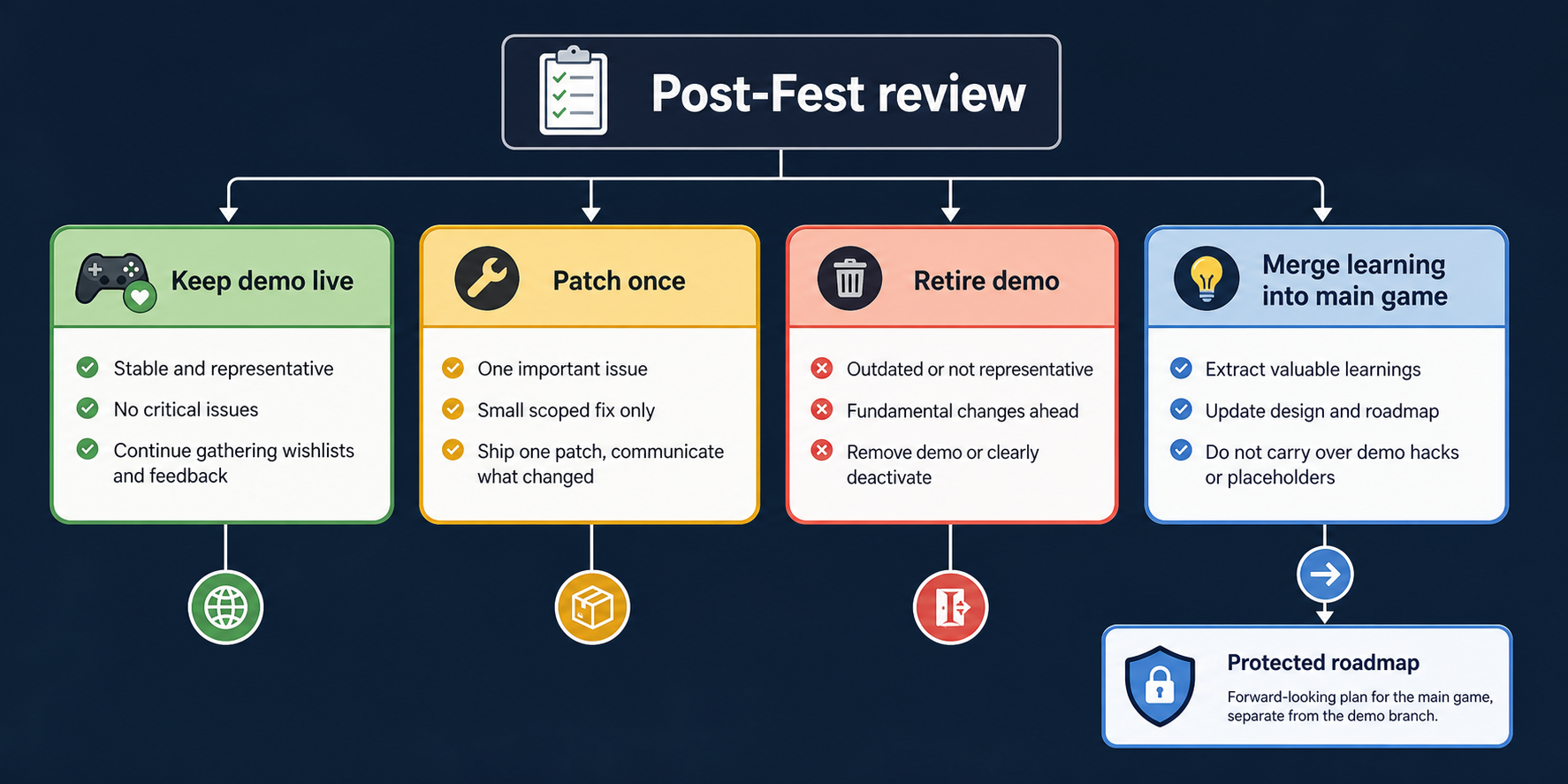
Do not keep patching the demo because it is the only part of the game with an audience. That is how a marketing asset turns into the new project.
The merge-back review should be boring:
- Which shared-system fixes are safe to merge?
- Which demo-only files get deleted or archived?
- Which fake systems need replacement tickets?
- Which player complaints change the full-game roadmap?
- Which complaints are demo-specific and should not steer production?
If you cannot answer those questions, the demo was not labeled clearly enough in step 4. Fix the labeling now, before the next deadline makes the mess permanent.
Common pitfalls
Picking the nearest Fest. The nearest Fest feels motivating. It is often just too soon. Pick the Fest that gives you scope freeze, playtest, code freeze, and Steam review buffer.
Building new systems for the demo. If the system is not part of the full game plan, do not build it for a one-week event. Fake it, label it, or cut it.
Cutting onboarding first. New players do not know what you know. If the demo needs one polished thing, it is the first five minutes.
Patching the demo forever. The demo should either stay live for a reason, get one planned patch, or retire. Permanent demo maintenance steals from the actual game.
Launching without feedback capture. A feedback link added after launch misses the players you needed most. Build the capture route before you submit to Steam.
Treating wishlists as the only result. Wishlists matter, but so do quit points, bug clusters, streamer confusion, and the exact words players use when the promise clicks.
What to do next
Start with the demo promise. If you cannot write it in one sentence, go back to The Vertical Slice Protocol and decide what your playable chunk is proving. If the sentence is clear but the scope list keeps growing, use Scope Creep Is Killing Your Game to cut it back. If the demo is almost ready but you keep polishing instead of freezing, The Last-Mile Decision is the next read.
Your Steam page has to carry its side of the promise too. For that, use How to Write a Steam Page That Actually Sells Your Indie Game.
The missing piece for most small teams is not another checklist. It is a person who helps hold the cut line when the deadline starts making bad ideas look reasonable. Sign up for Clowdr if you want contributors who can pressure-test the demo, own the QA pass, and keep the actual game moving while Next Fest tries to eat the schedule.